

Every Mazda is designed around the idea that driving should feel natural, not interrupted. That philosophy extends beyond steering and performance into how drivers interact with technology. Systems like Mazda Connect, Apple CarPlay, and Android Auto are not just added features. They are structured to simplify how information, communication, and navigation come together while you are driving. For many shoppers, the real question is not whether these features exist, but whether they actually make daily driving easier or more complicated.
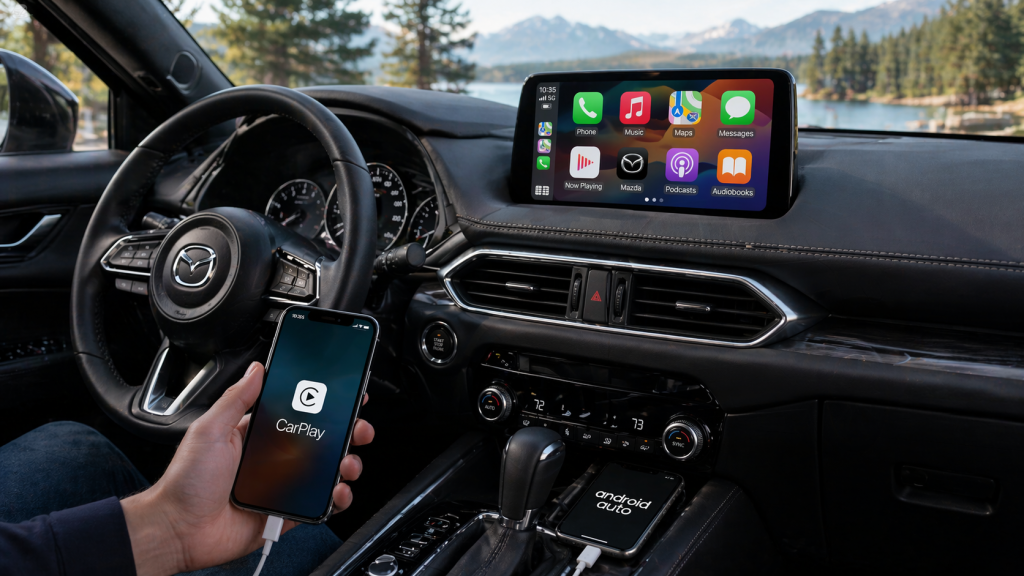
How Mazda Connect Organizes Your Driving Experience
What is Mazda Connect system
Mazda Connect is the central interface that organizes vehicle information, media, navigation, and communication into a single, controlled system designed to reduce distraction.
In a vehicle like the Mazda CX 5, Mazda Connect acts as the foundation that everything else builds on. Instead of treating each feature as a separate system, it groups them into a unified interface that can be accessed consistently while driving.
This system works by simplifying how information is displayed and controlled. Rather than requiring multiple inputs or shifting between different screens, Mazda Connect keeps interactions structured and predictable.
- Navigation, music, and communication are all accessed through the same interface logic
- The system prioritizes clarity by limiting visual clutter on the screen
- Controls are designed to be consistent regardless of which feature is being used
This matters in real driving conditions because the brain processes familiar patterns faster than new ones. When the system behaves consistently, drivers spend less time thinking about how to use it and more time focused on the road.
For a driver, Mazda Connect turns multiple digital tools into one continuous experience rather than a collection of separate features.
How Apple CarPlay And Android Auto Actually Work Inside A Mazda
How do you connect Apple CarPlay in a Mazda
Apple CarPlay connects your smartphone to the vehicle by mirroring key apps such as navigation, messaging, and music onto the Mazda Connect display.
Does Mazda support Android Auto
Mazda supports Android Auto in the same way, allowing Android devices to project their core apps into the vehicle interface.
In models like the Mazda CX 50 and Mazda CX 30, this integration works by creating a controlled link between your phone and the vehicle. Instead of duplicating your entire phone screen, the system selects specific functions that are optimized for driving.
This process is called interface mirroring, but it is more selective than a full screen projection. Only apps that are designed for driving use are displayed, and they are reformatted to fit the Mazda Connect layout.
- Navigation apps provide simplified directions with larger visual cues
- Messaging systems convert texts into voice readable formats
- Music apps are reorganized for quick selection and minimal scrolling
The benefit is not just convenience. It is consistency. Your phone’s most important functions become part of the vehicle without requiring you to pick up your device.
For drivers, this means familiar tools are available in a way that feels integrated rather than distracting.
Why Mazda Uses A Command Knob Instead Of A Touchscreen
Mazda uses a command knob control system because it reduces the need to reach forward and visually focus on the screen while driving.
In vehicles like the Mazda3, this control method changes how drivers interact with the infotainment system. Instead of tapping a screen, inputs are made through a rotary controller positioned near the gear selector.
This design is based on how human attention works in motion. Reaching toward a touchscreen requires both visual confirmation and physical adjustment. Using a command knob allows the driver to keep their hand in a stable position and rely more on muscle memory.
- The knob allows scrolling and selection without extended reach
- Physical feedback provides confirmation without needing to look directly
- The system reduces the time eyes are off the road
This approach is different from many competitors, but it is intentional. It prioritizes control and awareness over visual interaction.
For a driver, this means less interruption and a more stable connection to the driving experience.
How Voice And App Integration Reduce Driver Distraction
Is Mazda infotainment easy to use while driving
Mazda infotainment is designed to be easy to use while driving by reducing the number of manual inputs required and shifting interaction toward voice and simplified controls.
In vehicles like the Mazda CX 90, voice integration works alongside Apple CarPlay and Android Auto to allow drivers to perform actions without physically interacting with the system.
This includes sending messages, selecting music, or setting navigation destinations using spoken commands.
The system reduces distraction by limiting how often the driver needs to divide attention.
- Voice commands replace manual typing or scrolling
- App layouts are simplified to reduce decision time
- System responses are designed to be quick and predictable
This matters because distraction is not just about taking your eyes off the road. It is also about how much mental effort is required to complete a task.
By simplifying both physical and cognitive interaction, Mazda reduces the overall load placed on the driver.
What To Expect When Setting Up And Using The System Daily
Connecting your phone to Mazda Connect is designed to be straightforward, but more importantly, it is designed to stay consistent once set up.
In most Mazda models, including the Mazda CX 5 and Mazda CX 50, setup involves connecting your device through a wired or wireless connection depending on the vehicle configuration. Once connected, the system recognizes your device and automatically loads your preferred interface.
What matters is not just the setup, but how the system behaves after that.
- The system reconnects automatically when you enter the vehicle
- Your apps appear in the same layout each time
- Controls remain consistent regardless of which app you use
This consistency is what makes the experience feel easy over time. There is no need to relearn the system each time you drive.
For shoppers, this is where the value becomes clear. The technology does not ask you to adapt to it. It adapts to your habits and becomes part of your routine.
Connect with us


